Imagine a medieval castle. A would-be attacker doesn’t just face one locked door — they face a wide moat, a raised drawbridge, high outer walls, inner walls, armed guards at every post, a fortified keep, and a locked vault at the center. Each barrier is independent. Defeating one does not defeat them all. This is Defense in Depth — and it is the most important concept in modern cybersecurity.
Today’s cyber threats are sophisticated, relentless, and expensive. A single firewall or antivirus program is no longer enough. The most resilient organizations, governments, and individuals layer their defenses so that if one control fails, others catch the attack. This guide explains exactly how that works — from the foundational concept to practical implementation — for everyone from home users to enterprise security teams.
Whether you are a home user trying to protect your family, an employee trying to understand workplace security policies, a small business owner, or someone pursuing a cybersecurity career — this guide is written for you. No prior technical expertise is required.
1. What Is Defense in Depth?
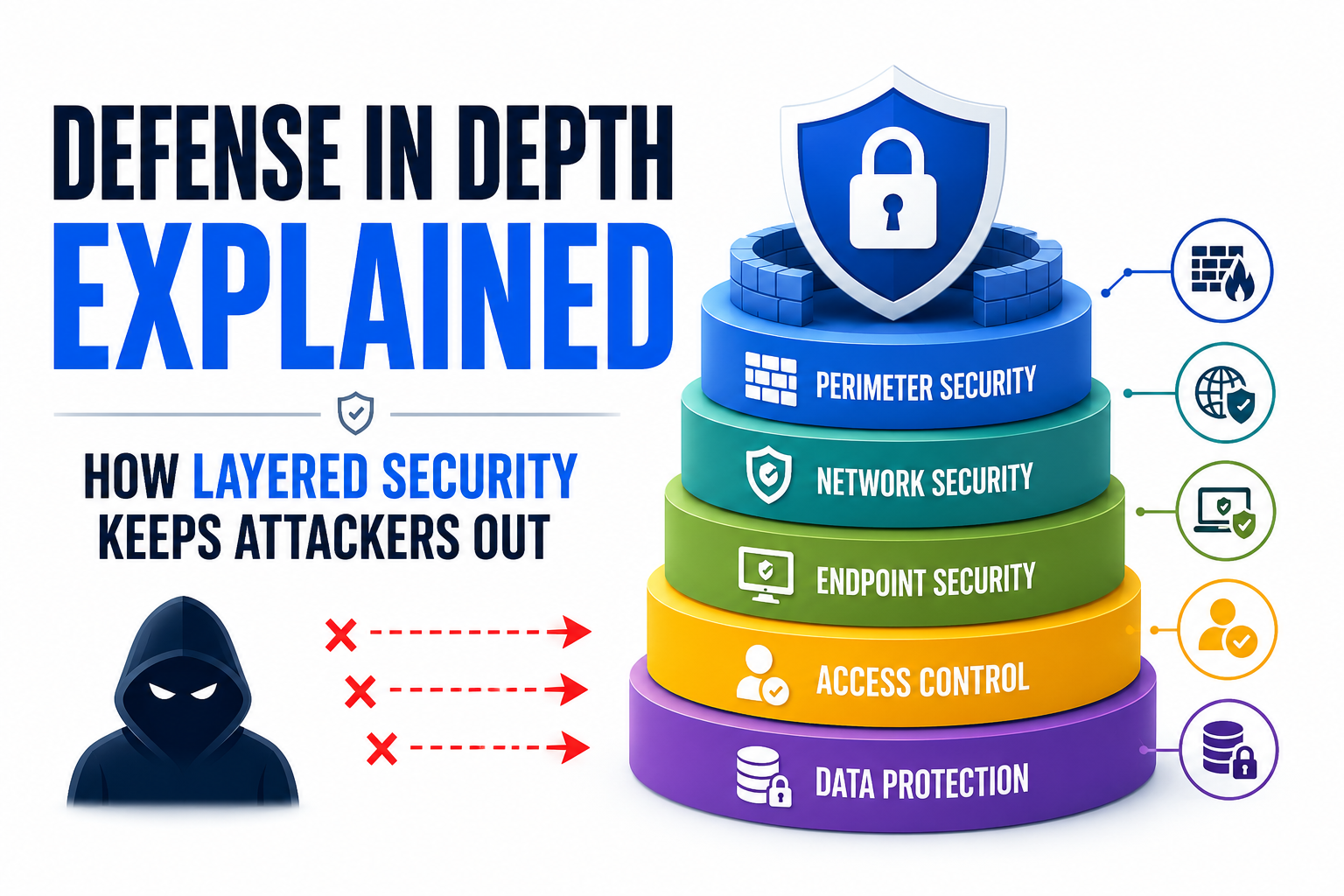
Defense in Depth (DiD) is a cybersecurity strategy that uses multiple, independent layers of security controls to protect information, systems, and networks. The core idea: if one layer is bypassed or fails, additional layers continue to detect, delay, or stop the attack. No single point of failure can compromise the entire system.
The term was originally a military concept meaning to slow an enemy’s advance by trading space for time — rather than concentrating all defenses in one line, forces are arranged in successive positions. Applied to cybersecurity, it means placing security controls at every level of your digital environment: from the physical hardware to the applications running on it, from the network perimeter to individual user behaviors.
The Core Principle: Assume Any Single Control Can Fail
The foundation of Defense in Depth is a sobering but realistic assumption: any single security control can be bypassed, misconfigured, or defeated by a sophisticated enough attacker. History consistently proves this. Firewalls are circumvented. Passwords are stolen. Antivirus misses zero-day malware. Employees click phishing links.
The solution is not to find a perfect single control — it is to build a system where an attacker must defeat multiple independent controls simultaneously. The probability that an attacker successfully breaches a firewall AND bypasses endpoint detection AND avoids SIEM alerts AND defeats MFA AND avoids human detection drops dramatically with each additional layer.
Many home users and small businesses believe that having one good antivirus program or a firewall is “enough.” This is dangerously false. In 2024, over 68% of data breaches involved a human element — phishing, stolen credentials, or social engineering — that most single-layer defenses cannot stop on their own.
2. Origins & History of Defense in Depth
Defense in Depth has roots stretching back thousands of years, but its application to information security is relatively recent and rapidly evolving.
Military Origins
Ancient fortifications — from Egyptian citadels to medieval European castles — embodied layered defense physically. The Roman Limes (frontier defense system) used multiple lines of forts, walls, watchtowers, and patrols. Medieval castles layered moats, outer walls, inner walls, towers, and keeps. The attacker had to defeat each in turn, giving defenders time and options.
In 20th-century warfare, the concept was formalized. During World War I, German elastic defense tactics absorbed attacks by yielding the front line while counterattacking from prepared positions deeper in. The U.S. military doctrine later codified “defense in depth” as a core principle of ground warfare.
Transition to Cybersecurity
The U.S. National Security Agency (NSA) was among the first to formally apply Defense in Depth to information security, publishing guidance in the early 2000s recommending organizations treat network security as a series of overlapping, redundant controls rather than a single perimeter. The National Institute of Standards and Technology (NIST) embedded layered security controls throughout its Cybersecurity Framework and Special Publications (SP 800-53).
Today, Defense in Depth is universally recognized as a best practice by NIST, CISA (Cybersecurity and Infrastructure Security Agency), ISO 27001, SANS, CIS (Center for Internet Security), and virtually every major cybersecurity framework worldwide.
3. Why Defense in Depth Matters More Than Ever
The threat landscape has fundamentally shifted. Attackers today are not lone hackers in basements — they are organized criminal enterprises, nation-state actors with unlimited budgets, and AI-powered automated attack tools that probe millions of systems continuously. The perimeter-based security model — where you build one strong wall and trust everything inside it — has collapsed.
Why the Old “Castle Wall” Model Fails
The traditional perimeter security model assumed that everything outside the network was dangerous and everything inside was safe. This model has been devastated by three modern realities:
- Remote Work & Cloud Computing: Employees access company systems from home, coffee shops, and mobile devices. The “inside” and “outside” no longer have clear boundaries.
- Third-Party and Supply Chain Attacks: The SolarWinds breach (2020) compromised 18,000 organizations — including U.S. government agencies — by attacking a trusted software vendor, not the organizations directly. The attack came from “inside” once the malicious software update was installed.
- Insider Threats: Employees, contractors, and partners with legitimate access are responsible for approximately 19% of all data breaches (IBM, 2023). A single perimeter wall provides zero protection against these threats.
The 2020 SolarWinds supply chain attack demonstrated that even the most well-funded organizations can be compromised when they rely on perimeter security alone. Organizations with robust Defense in Depth — network segmentation, behavioral analytics, anomaly detection, and endpoint monitoring — were significantly better positioned to detect and limit the damage from the malicious code that bypassed every perimeter control.
4. The 7 Layers of Defense in Depth — Explained
Defense in Depth is typically organized into seven conceptual layers. Each layer addresses a different attack surface and uses different types of controls. Think of these layers as concentric rings of protection, with your most valuable assets (data) at the center.
Layer 1: Physical Security
Physical security is the outermost layer and the most tangible one. It controls who can physically access hardware, buildings, data centers, and equipment. No amount of digital security matters if an attacker can walk into a server room and unplug a hard drive.
- Access Controls: Key cards, PIN pads, biometric scanners at entry points
- Surveillance: CCTV cameras, motion detectors, security guards
- Environmental Controls: Fire suppression, temperature control, backup power (UPS)
- Device Security: Cable locks for laptops, locked server racks, USB port blockers
- Clean Desk Policy: No sensitive documents left visible; screens locked when unattended
In 2010, the Stuxnet worm — designed to sabotage Iranian nuclear centrifuges — was delivered via a USB drive left in a parking lot. An employee picked it up and plugged it in, bypassing all digital perimeter defenses. Physical security controls (USB port restrictions, security awareness training) would have stopped this attack at Layer 1.
Layer 2: Network Perimeter Security
The network perimeter is where your private network meets the outside world (the internet). This is traditionally the first digital layer of defense and includes the controls that monitor and filter traffic entering and leaving your network.
- Firewall: A system (hardware or software) that filters network traffic based on predetermined rules. Think of it as the gatekeeper that inspects every “car” (data packet) entering and leaving your network.
- IDS/IPS (Intrusion Detection System / Intrusion Prevention System): Tools that monitor network traffic for suspicious patterns. IDS alerts you; IPS actively blocks the suspicious traffic.
- DMZ (Demilitarized Zone): A separate network segment between the internet and your internal network that hosts public-facing servers (websites, email) while keeping them isolated from sensitive internal systems.
- VPN (Virtual Private Network): Encrypts network traffic between remote workers and the organization’s internal network, protecting data in transit.
- DNS Filtering: Blocks connections to known malicious websites before they can even load.
Layer 3: Internal Network Security
Once inside your network perimeter, attackers should not be able to move freely. Internal network security limits what an attacker (or a compromised device) can reach within your network — a principle called lateral movement prevention.
- Network Segmentation: Dividing a network into smaller, isolated zones. A breach in the guest Wi-Fi zone should not automatically give access to the accounting database.
- VLANs (Virtual Local Area Networks): A technology that logically separates devices into different network groups even if they share the same physical infrastructure.
- Network Access Control (NAC): Ensures only authorized, compliant devices can connect to the internal network. A personal laptop without up-to-date patches would be blocked.
- Zero Trust Network Access (ZTNA): An advanced model where no device or user is automatically trusted, even if they’re inside the network — every access request must be explicitly verified.
Layer 4: Host / Endpoint Security
Every device (computer, laptop, phone, server, tablet) that connects to your network is an “endpoint.” Host security protects these individual devices from compromise.
- Antivirus / Anti-malware: Software that detects and removes malicious programs. Modern solutions use behavioral analysis, not just signature databases.
- EDR (Endpoint Detection & Response): Advanced antivirus that continuously monitors endpoint behavior, records activities, and enables rapid response to detected threats.
- Patch Management: Regularly applying security updates to operating systems and applications to close known vulnerabilities. The 2017 WannaCry ransomware attack exploited a Windows vulnerability for which a patch had been available for two months.
- Host-Based Firewall: A firewall built into the operating system (like Windows Defender Firewall) that protects the device itself, not just the network.
- Full Disk Encryption (FDE): Encrypts all data on a device, making it unreadable if the device is stolen. BitLocker (Windows) and FileVault (Mac) are common examples.
- Application Whitelisting: Only approved applications are allowed to run. Unapproved software — including malware — is blocked by default.
Layer 5: Application Security
Applications — websites, mobile apps, enterprise software — are prime attack targets because they are designed to accept input from external users. Application security ensures these programs cannot be manipulated to behave in unintended ways.
- WAF (Web Application Firewall): Filters and monitors HTTP traffic to and from web applications, blocking common attacks like SQL injection and cross-site scripting (XSS).
- Input Validation: Ensuring that applications only accept expected, correctly formatted data. Failing to validate input is the cause of most injection attacks.
- Secure Software Development Lifecycle (SSDLC): Building security into software from the design phase rather than adding it as an afterthought.
- Regular Penetration Testing: Hiring security professionals (ethical hackers) to actively attempt to breach your applications and report vulnerabilities before real attackers find them.
- Vulnerability Scanning: Automated tools that regularly check applications for known security weaknesses.
Layer 6: Data Security
Data is the ultimate target of nearly every cyberattack. Even if an attacker breaches all other layers, robust data security can prevent them from reading, stealing, or destroying the information they seek.
- Encryption at Rest: Data stored in databases or files is encrypted, so even if an attacker copies the data files, they cannot read the contents without the encryption key.
- Encryption in Transit: Data moving across a network is encrypted using protocols like TLS (Transport Layer Security). This is why HTTPS in your browser matters.
- Access Control (Least Privilege): Users are given the minimum permissions needed to do their jobs. An accounting clerk should not have access to HR personnel files.
- Data Loss Prevention (DLP): Tools that monitor and control data movement, preventing sensitive information from being emailed to unauthorized parties or copied to USB drives.
- Data Classification: Labeling data by sensitivity level (public, internal, confidential, top secret) and applying appropriate controls to each category.
- Backups (3-2-1 Rule): Maintaining 3 copies of data, on 2 different media types, with 1 copy stored offsite/offline — the primary defense against ransomware.
Maintain 3 copies of your data (original + 2 backups), on 2 different storage media (e.g., external drive + cloud), with 1 copy stored completely offline or offsite. Ransomware cannot encrypt a backup it cannot reach. This single practice can determine whether a ransomware attack costs you an afternoon or destroys your business.
Layer 7: Human & Policy Layer
Humans are simultaneously the most important and the most exploited layer of security. According to the 2024 Verizon DBIR report, 68% of all breaches involved a non-malicious human element — someone was tricked, made a mistake, or misused access. No technical control fully compensates for an uninformed, untrained, or careless user.
- Security Awareness Training: Regular, engaging training that teaches employees to recognize phishing emails, social engineering, and unsafe behaviors.
- Acceptable Use Policies (AUP): Written policies that define how company technology and data may be used — and the consequences of misuse.
- Incident Response Planning: A documented plan for how the organization will detect, respond to, and recover from a security incident. Organizations without an IR plan take 55% longer to contain breaches (IBM, 2024).
- Security Culture: The overall attitude and behaviors of an organization toward security. A strong security culture means employees view security as everyone’s responsibility, not just IT’s problem.
- Governance & Compliance: Policies, audits, and regulatory frameworks (like GDPR, HIPAA, PCI-DSS) that provide oversight and accountability structures.
Real-World Scenarios
5. How Layered Security Stops Real Attacks
The true power of Defense in Depth is best understood through real-world attack scenarios. Let’s walk through three common attack types and see how layers work together — and what happens when they don’t.
Scenario 1: Phishing Attack Targeting an Employee
The Setup: An employee receives a convincing email pretending to be from their company’s IT department, asking them to click a link and enter their Microsoft 365 credentials on a fake login page.
- Layer 7 (Human): The employee has been trained to inspect email headers and hover over links before clicking. They notice the link goes to “micros0ft-login.net” — not microsoft.com. They report it and do not click. Attack stopped at Layer 7.
- If they click anyway → Layer 2 (Network Perimeter / DNS Filter): The DNS filter recognizes “micros0ft-login.net” as a known phishing domain and blocks the connection before it loads. Attack stopped at Layer 2.
- If the DNS filter misses a new domain → Browser/Email Security: Google Safe Browsing or Microsoft Defender SmartScreen flags the page as dangerous and warns the user. Attack stopped by application layer.
- If the user ignores the warning → Layer 6 (Data/Identity) — MFA: Even if credentials are stolen, the attacker cannot log in without the second factor (the authentication app on the employee’s phone). Attack stopped at Layer 6.
- If MFA is somehow bypassed → Layer 3/SIEM: A login from an unusual IP address or country triggers an alert in the organization’s SIEM (Security Information and Event Management) system. The security team notices and forces a password reset within minutes. Attack detected and contained.
Scenario 2: Single-Layer Failure — What Goes Wrong
The Setup: A small business relies on a single firewall and basic antivirus. No MFA, no employee training, no network segmentation, no backups.
- An employee clicks a phishing link → credentials stolen (no training, no MFA)
- Attacker logs into company VPN with valid credentials → firewall allows it (legitimate-looking traffic)
- Attacker moves laterally across the flat network → no segmentation to stop them
- Attacker deploys ransomware → antivirus misses zero-day variant
- Ransomware encrypts all data including backups (backups were on the same network)
Scenario 3: Ransomware with Defense in Depth
Same initial infection, different outcome with layered defenses in place:
- Ransomware somehow installs on one endpoint (initial defense failed)
- EDR (Endpoint Layer): Detects unusual file encryption behavior within seconds and quarantines the device
- Network Segmentation (Internal Network Layer): The infection cannot spread from the isolated network segment to the rest of the business
- Offline Backup (Data Layer): All data can be restored from last night’s offline backup
- SIEM Alert (Monitoring): Security team receives an alert within 90 seconds and verifies containment
- Incident Response Plan (Policy Layer): Pre-defined response steps are executed — no panic, no confusion
6. Modern Threats That Defense in Depth Addresses
| Threat Type | Description | Primary Layers That Defend | Severity |
|---|---|---|---|
| Phishing / Spear Phishing | Deceptive emails/messages tricking users into revealing credentials or installing malware | Human training, email filtering, MFA, DNS filtering | CRITICAL |
| Ransomware | Malware that encrypts all data and demands payment for decryption keys | Endpoint (EDR), backups, network segmentation, email filtering | CRITICAL |
| Credential Stuffing | Using leaked username/password pairs to attempt logins at scale | MFA, rate limiting, anomaly detection, password managers | HIGH |
| SQL Injection | Inserting malicious database commands into application input fields | WAF, input validation, application security | HIGH |
| Insider Threats | Employees or contractors misusing legitimate access to steal or destroy data | Least privilege, DLP, user behavior analytics, access logging | HIGH |
| Man-in-the-Middle (MitM) | Intercepting communications between two parties to eavesdrop or alter data | TLS/HTTPS encryption, VPN, network monitoring, certificate validation | MEDIUM |
| Zero-Day Exploits | Attacks exploiting vulnerabilities unknown to the vendor — no patch exists yet | Behavioral EDR, network segmentation, threat intelligence, monitoring | CRITICAL |
| Supply Chain Attacks | Compromising trusted software vendors to deliver malware through updates | Software verification, network monitoring, SIEM, least privilege | CRITICAL |
| Distributed Denial of Service (DDoS) | Overwhelming servers with traffic to make services unavailable | CDN/DDoS mitigation, network perimeter, rate limiting | MEDIUM |
| Social Engineering | Manipulating people into divulging information or performing actions (not just email) | Security awareness training, verification procedures, culture | HIGH |
| Physical Theft | Stealing devices to access data or use them as attack vectors | Physical security, full disk encryption, remote wipe capability | MEDIUM |
| Source: CISA, Verizon DBIR 2024, IBM Cost of a Data Breach Report 2024 | |||
7. Security Controls: A Deep Dive
Security controls are the specific tools, procedures, and mechanisms that make up each layer. They are grouped into three fundamental categories — and effective Defense in Depth uses all three types at every layer.
| Control Type | Purpose | Examples | When It Acts |
|---|---|---|---|
| Preventive Controls | Stop an attack or unauthorized action from occurring in the first place | Firewalls, access controls, MFA, encryption, input validation, security training | BEFORE the attack |
| Detective Controls | Identify and alert when an attack or policy violation has occurred or is occurring | IDS, SIEM, log monitoring, audit logs, user behavior analytics (UBA), file integrity monitoring | DURING the attack |
| Corrective Controls | Minimize damage and restore normal operations after an attack | Data backups, incident response plans, patch management, EDR quarantine, disaster recovery | AFTER the attack |
Additional Control Classifications
Security professionals also classify controls by their nature:
| Nature | Description | Examples |
|---|---|---|
| Technical (Logical) | Implemented through technology — hardware or software | Firewalls, antivirus, encryption, MFA systems, SIEM |
| Administrative (Managerial) | Policies, procedures, and governance frameworks | Security policies, user training, access control procedures, risk assessments, background checks |
| Physical / Operational | Physical measures protecting hardware and facilities | Locks, key cards, security guards, CCTV, server rack locks, visitor logs |
Administrative controls are consistently underinvested by organizations that focus all their budget on technical tools. A company with a $100,000 SIEM system but no incident response plan, no security training, and no access control policy will be less secure than a company with modest technical tools and strong administrative processes. Technology cannot substitute for governance.
8. Defense in Depth vs. Zero Trust: Complementary, Not Competing
Two terms that often appear together in cybersecurity discussions are Defense in Depth and Zero Trust. They are sometimes confused or treated as alternatives. They are not — they are complementary philosophies that work best together.
Zero Trust is a security model based on the principle: “Never trust, always verify.” It assumes that no user, device, or network connection — even those already inside the network — should be automatically trusted. Every access request must be explicitly authenticated and authorized, regardless of where it originates.
| Aspect | Defense in Depth | Zero Trust |
|---|---|---|
| Core Concept | Multiple independent security layers | Never trust, always verify |
| Primary Focus | Redundancy — if one control fails, others compensate | Verification — eliminate implicit trust entirely |
| Network Assumption | Inside is safer than outside (traditional view) | Hostile everywhere — inside and outside equally |
| Identity & Access | One of many layers | Central pillar — continuous verification |
| Origin | Military strategy adapted for IT | Modern cloud-era security philosophy (Forrester, 2010) |
| Best Used | As the overarching framework for all security controls | As the access control and identity philosophy within DiD layers |
| Relationship | Zero Trust is best implemented within a Defense in Depth framework — it strengthens the human, network, and data layers significantly. | |
In practice, a modern security architecture uses Defense in Depth as the overarching strategy (multiple layers of controls) and Zero Trust as the philosophical lens applied to the identity, access, and network layers (constant verification, least privilege, micro-segmentation).
9. Implementing Defense in Depth: Individuals & Families
Defense in Depth is not just for corporations and governments. Every person with a smartphone, a laptop, and an internet connection is a potential target. Here is a practical, layered security approach for home users.
- Layer 1 – Physical: Lock your devices when stepping away. Use screen lock PINs/passwords. Never leave devices unattended in public.
- Layer 2 – Network: Use a reputable home router with WPA3 encryption. Change the default router password. Use a VPN on public Wi-Fi networks.
- Layer 3 – Network Segmentation: Create a separate guest Wi-Fi network for IoT devices (smart TVs, cameras, doorbells).
- Layer 4 – Endpoint: Keep your OS and apps updated (enable auto-updates). Use reputable antivirus/anti-malware software. Enable full disk encryption.
- Layer 5 – Application: Use a reputable browser with built-in phishing protection. Install a browser extension like uBlock Origin to block malicious ads.
- Layer 6 – Data: Use a password manager (Bitwarden, 1Password) with unique, strong passwords for every account. Enable MFA (Multi-Factor Authentication) on every account that supports it. Back up important data to an offline drive plus cloud storage.
- Layer 7 – Human: Learn to recognize phishing emails. Never share passwords. Be suspicious of unexpected urgent requests for money or information. Teach family members basic security awareness.
The Single Most Important Step for Home Users: MFA
If you do only one thing after reading this article, enable Multi-Factor Authentication (MFA) on all your important accounts — especially email, banking, and social media. MFA adds a second verification step (usually a code sent to your phone or generated by an app) after your password. According to Microsoft, MFA blocks 99.9% of automated account compromise attacks. Your password alone is not enough in 2025.
“Enabling MFA is the single most impactful security action an individual can take. It blocks the vast majority of automated credential-based attacks instantly.” — Microsoft Security, 2023 Cyber Signals Report
10. Implementing Defense in Depth: Small & Medium Businesses
Small and medium businesses (SMBs) are disproportionately targeted by cybercriminals precisely because they typically have limited security resources. Yet 60% of SMBs close permanently within six months of a significant cyberattack. A structured, layered approach — even with a modest budget — dramatically reduces risk.
Most SMB cyberattacks are not targeted — they are opportunistic. Automated scanning tools probe every internet-connected system continuously, exploiting any weakness they find. Your business size is irrelevant to an automated botnet looking for unpatched servers or weak passwords. Every business is a target.
Priority Layers for SMBs (Budget-Constrained Approach)
| Priority | Control | Why It Matters | Cost |
|---|---|---|---|
| 🥇 1 | MFA on all accounts (especially email & admin) | Blocks majority of credential-based attacks | Free–Low |
| 🥈 2 | Automated patch management | Closes known vulnerabilities before attackers exploit them | Free–Low |
| 🥉 3 | Offline/cloud backups (3-2-1 rule) | Primary defense against ransomware; enables business recovery | Low–Medium |
| 4 | Employee security awareness training | Human layer — most exploited attack surface | Low |
| 5 | Business-grade firewall + DNS filtering | Blocks malicious traffic; categorizes and filters web access | Medium |
| 6 | EDR (Endpoint Detection & Response) | Superior to traditional antivirus; behavioral threat detection | Medium |
| 7 | Network segmentation (separate guest & operational networks) | Limits lateral movement; contains breaches to one segment | Low–Medium |
| 8 | Written Incident Response Plan | Drastically reduces response time; limits confusion and damage | Free (time investment) |
11. Enterprise Defense in Depth: Advanced Implementation
Enterprise organizations have more complex environments, larger attack surfaces, and greater regulatory obligations — but also more resources to build comprehensive layered security. Enterprise Defense in Depth integrates dozens of specialized controls across all seven layers.
Advanced Enterprise Controls by Layer
Identity & Access Management (IAM)
Enterprise-grade IAM systems manage authentication and authorization at scale — ensuring every user has exactly the right access, no more and no less. Key capabilities include single sign-on (SSO), Privileged Access Management (PAM) for administrative accounts, and continuous access evaluation that revokes permissions in real-time when risk signals are detected.
SIEM — Security Information and Event Management
A SIEM is the nervous system of an enterprise security operation. It collects logs and events from every layer — firewalls, endpoints, applications, cloud services, databases — correlates them into a unified view, and generates alerts when patterns suggest an attack. Without SIEM, an attacker can move through multiple layers undetected because no single layer “sees” the full picture. With SIEM, suspicious patterns spanning multiple systems are immediately visible.
SOC — Security Operations Center
A 24/7 team of security analysts who monitor the SIEM, investigate alerts, hunt for threats, and coordinate incident response. The SOC is the human layer at its most professional — trained analysts making real-time decisions based on telemetry from across the entire security stack.
Threat Intelligence
Subscribing to threat intelligence feeds — curated, real-time information about active attack campaigns, new malware strains, and known threat actor tactics — allows security teams to proactively update defenses before known threats arrive. MITRE ATT&CK framework provides a comprehensive taxonomy of adversary tactics and techniques that threat intelligence maps to.
Deception Technology (Honeypots)
Fake systems and data designed to lure and detect attackers who have already bypassed perimeter controls. When an attacker interacts with a honeypot, it is an unambiguous indicator of compromise — no legitimate user should ever access a honeypot resource. This provides extremely high-fidelity alerts with minimal false positives.
Red Team / Purple Team Operations
Red teams (ethical hackers) actively simulate real-world attacks against the organization. Blue teams defend. Purple teams combine both to maximize learning. These exercises stress-test defenses, identify gaps, and validate that layered controls actually work as intended — not just in theory.
12. Common Defense in Depth Mistakes to Avoid
| Mistake | Why It’s Dangerous | The Fix |
|---|---|---|
| Treating layers as silos | Controls don’t share data; attackers move between layers undetected | Integrate controls (SIEM collects data from all layers); ensure visibility across the stack |
| Skipping the human layer | 68% of breaches involve human error; technology alone cannot compensate | Regular, engaging security awareness training; build a security culture |
| Ignoring patch management | Most successful attacks exploit known, patchable vulnerabilities | Automate patching; patch critical vulnerabilities within 72 hours |
| Flat network (no segmentation) | Single breach gives attacker access to everything | Segment networks by function; limit lateral movement |
| Untested backups | Backups that have never been restored may fail when needed most | Test backup restoration quarterly; document the recovery process |
| Over-privileged accounts | Compromised accounts with excessive permissions cause far more damage | Implement least privilege; review permissions quarterly; use PAM for admin accounts |
| No incident response plan | Organizations without an IR plan take 55% longer to contain breaches | Create, document, and regularly test an incident response plan |
| Compliance ≠ Security | Meeting regulatory minimums does not equal being secure; attackers don’t check compliance boxes | Use compliance as a floor, not a ceiling; continuously improve beyond minimums |
| “Set and forget” security | Threat landscape evolves constantly; yesterday’s defense is today’s gap | Conduct regular risk assessments; review and update controls continuously |
13. Industry Frameworks Supporting Defense in Depth
Defense in Depth is not a proprietary concept — it is codified across every major cybersecurity framework. Understanding these frameworks is essential for anyone pursuing a cybersecurity career.
| Framework | Publisher | DiD Alignment | Best For |
|---|---|---|---|
| NIST Cybersecurity Framework (CSF 2.0) | NIST (U.S. Gov.) | Organizes controls into: Govern, Identify, Protect, Detect, Respond, Recover — each corresponding to DiD layer types | All organizations; U.S. federal baseline |
| NIST SP 800-53 | NIST | Comprehensive control catalog with hundreds of layered security controls mapped to risk categories | Federal agencies; large enterprises |
| ISO/IEC 27001 | ISO | Information Security Management System standard with 93 controls across organizational, people, physical, and technological domains — directly maps to DiD layers | International organizations; certification |
| CIS Controls v8 | Center for Internet Security | 18 prioritized security controls organized by implementation group; explicitly recommends layered approach | All sizes; practical prioritization |
| MITRE ATT&CK | MITRE Corporation | Adversary tactics and techniques taxonomy; maps attacks to layers where they occur — enables targeted layered defense | Threat intelligence; red/blue teams |
| OWASP Top 10 | OWASP Foundation | Focuses on application layer (Layer 5); identifies top web application risks and layered remediation | Web developers; application security |
| DoD 8570 / DoD 8140 | U.S. Department of Defense | Workforce framework requiring DoD cybersecurity professionals to hold certifications mapped to DiD roles (protect, detect, respond) | U.S. defense sector; government contractors |
- Defense in Depth uses multiple independent security layers so that no single failure leads to total compromise
- The 7 layers are: Physical, Network Perimeter, Internal Network, Host/Endpoint, Application, Data, and Human/Policy
- Every layer needs all three control types: Preventive, Detective, and Corrective
- The human layer is the most exploited — security awareness training is non-negotiable
- Offline backups following the 3-2-1 rule are the last line of defense against ransomware
- Zero Trust complements Defense in Depth — they are not alternatives
- SMBs are frequent targets; a prioritized, layered approach dramatically reduces risk even on modest budgets
- No framework, tool, or strategy is “set and forget” — continuous review and adaptation is essential
- MFA alone can block 99.9% of automated account attacks — enable it everywhere, immediately
Frequently Asked Questions
14. Frequently Asked Questions
Defense in Depth is a cybersecurity strategy that uses multiple, independent layers of protection. Instead of relying on a single security measure (like a firewall or antivirus), it stacks many different controls so that if one fails, others still protect you. Think of it like a medieval castle: a moat, walls, guards, and a locked keep — an attacker must overcome each one.
Absolutely — arguably more relevant than ever. The threat landscape has grown dramatically more sophisticated, with AI-powered attacks, supply chain compromises, and ransomware-as-a-service models that make automated, targeted attacks accessible to less-skilled criminals. The perimeter-based security model has collapsed under the weight of cloud computing and remote work. Defense in Depth’s layered approach adapts to this reality by ensuring multiple controls are always in play. It is recommended by NIST, CISA, NSA, ISO, and every major cybersecurity authority as the fundamental security strategy.
All layers matter — the entire point is that you cannot rely on any single one. However, security experts consistently point to the human layer as the most critical and most neglected. The 2024 Verizon DBIR reports that 68% of breaches involve a non-malicious human element. Technology is only as effective as the humans who configure, use, and maintain it. Organizations with excellent technical controls but poor security awareness training are frequently breached through simple phishing attacks that bypass sophisticated tools.
Defense in Depth is the overarching strategy of using multiple layers of security controls. Zero Trust is a security philosophy that says no user, device, or network connection should be automatically trusted — everything must be continuously verified. They are complementary: Zero Trust principles are best implemented within a Defense in Depth framework, particularly strengthening the identity, access control, and network layers. Using Zero Trust in a single-layer environment would still leave you vulnerable if that single layer were defeated.
Yes. Defense in Depth is a strategy, not a budget line item. Many highly effective controls are free or very low cost: enabling MFA on all accounts (free), keeping software updated (free), creating an offline backup (cost of an external drive), writing a simple incident response plan (time investment), and providing basic security awareness training. The CIS Controls v8 Implementation Group 1 is specifically designed for SMBs with limited resources and provides a prioritized checklist of the most impactful controls. The question is not “Can we afford Defense in Depth?” — it is “Can we afford not to have it?”
The 3-2-1 rule is: maintain 3 copies of your data, on 2 different types of media, with 1 copy stored offline or offsite. It matters for Defense in Depth because data security is the last line of defense — even if every other layer fails, a good backup allows you to recover without paying ransom or losing critical information. Ransomware cannot encrypt what it cannot reach. An offline backup that is physically disconnected from your network is immune to even the most destructive ransomware attack.
Insider threats — from employees, contractors, or partners with legitimate access — are uniquely challenging because they bypass perimeter defenses by definition. Defense in Depth addresses this through the data and policy layers: least privilege access (users can only access what they need), data loss prevention (DLP) tools that monitor and restrict data movement, user behavior analytics (UBA) that detect anomalous activity patterns, comprehensive logging and audit trails, and role separation that prevents any single user from having unrestricted access. These controls make malicious or accidental insider actions difficult to execute and easy to detect.
Defense in Depth is a core concept covered across multiple cybersecurity certifications. The ISC2 CC (Certified in Cybersecurity) introduces DiD as a foundational concept. CompTIA Security+ dedicates significant coverage to layered security controls. CISSP (Certified Information Systems Security Professional) covers DiD at an architectural level. CISM (Certified Information Security Manager) addresses it from a management perspective. For networking-focused learners, the Cisco CCST and CCNA Security courses also incorporate DiD principles. Any credible cybersecurity certification will either explicitly teach or assume familiarity with layered security principles.
Summary
15. Summary: Your Defense in Depth Action Plan
Defense in Depth is not a product you buy or a project you complete. It is a continuous strategy of building, testing, and improving overlapping security controls across every layer of your digital environment. Here is a consolidated action plan to get started — regardless of your role or technical level.
- Enable MFA on all important accounts (email, banking, work, social media)
- Update all operating systems and applications — enable automatic updates
- Create a backup of critical data using the 3-2-1 rule; test that it restores
- Change default passwords on your router and any other network devices
- Audit which accounts and users have access to sensitive data — remove unnecessary permissions
- Implement a password manager and generate unique strong passwords for every account
- Segment your home or business network (create a guest network for IoT devices)
- Install/upgrade to a reputable EDR solution (vs. basic antivirus)
- Write or update your incident response plan — what will you do if you are breached?
- Conduct basic security awareness training for yourself, your family, or your team
- Enable full disk encryption on all computers and laptops
- Conduct a formal risk assessment against a recognized framework (NIST CSF, CIS Controls)
- Establish regular patch management cycles — critical patches within 72 hours
- Implement SIEM or log monitoring for your environment
- Run phishing simulations to test employee awareness; improve training based on results
- Conduct annual penetration testing or third-party security assessments
- Stay current on the threat landscape — subscribe to CISA, SANS, and security newsletter alerts
- Review and update your security controls and policies at least annually
🛡️ Final Thoughts: Security Is a Journey, Not a Destination
The cyber threat landscape evolves every single day. New attack techniques emerge, new vulnerabilities are discovered, and threat actors continuously refine their tactics. No organization or individual can ever claim to be “100% secure.”
What Defense in Depth gives you is not invulnerability — it is resilience. The confidence that when — not if — an attack occurs, multiple layers will detect, delay, contain, and allow you to recover from it. That is the true goal of cybersecurity: not to build an impenetrable wall, but to make the cost and complexity of a successful attack so high that attackers move on, and to limit the blast radius when they don’t.
Whether you are a home user enabling MFA for the first time, an IT administrator segmenting your network, or a CISO designing an enterprise security architecture — Defense in Depth is the foundational strategy that ties it all together. Build your layers. Test your controls. Train your people. And never stop improving.
16. References & Authoritative Resources
If you are pursuing a cybersecurity career, understanding Defense in Depth deeply will benefit you in virtually every certification exam (ISC2 CC, CompTIA Security+, CISSP, CISM) and every technical interview. Practice explaining it simply — to a non-technical friend or family member — and you will have demonstrated the communication skill that distinguishes outstanding cybersecurity professionals from merely technically competent ones.